https://www.playpcesor.com/2014/10/10-google-calendar-tips.html
https://www.playpcesor.com/2014/07/google-workflow.html
https://www.playpcesor.com/2016/05/google-contacts.html

我的記事簿
2018年3月1日 星期四

win7 不要自動更新 設定
1.先點擊 win 開始圖示,出現選單 選 [ 控制台 ];如下圖所示:

2.點擊 [ 系統及安全 ];如下圖所示:

3.點擊 [ Windows Update ];如下圖所示:

4.點擊視窗左端 [ 變更設定 ];如下圖所示:

5.點擊 [ 重要更新 ] > [ 自動安裝更新 ] 旁下拉按鈕 點擊 [ 永不檢查更新 ( 不建議 ) ];如下圖所示:

6.點擊右下角 [ 確定 ];如下圖所示:

2.點擊 [ 系統及安全 ];如下圖所示:
3.點擊 [ Windows Update ];如下圖所示:
4.點擊視窗左端 [ 變更設定 ];如下圖所示:
5.點擊 [ 重要更新 ] > [ 自動安裝更新 ] 旁下拉按鈕 點擊 [ 永不檢查更新 ( 不建議 ) ];如下圖所示:
6.點擊右下角 [ 確定 ];如下圖所示:
2018年2月22日 星期四



Selective Catalytic Reduction (SCR) of NO by NH3 in a Fixed‐bed Reacto
1.
Introduction
Fossil fuels have been main sources for energy in terms of
combustion, where chemical energy in fuels is converted into thermal and
mechanical energies. When air reacts with fuels at high temperature, NOx
representing NO, NO2, N2O, N2O5 and etc is unavoidable due to the reaction
between oxygen and nitrogen in air [1, 2]. NOx is toxic as itself as well as a
precursor of acid rain, so its regulation has been becoming more stringent all
over the countries. There has been much interest in reducing NOx from engines
in terms of fuel injection strategies [3], exhaust gas recirculation [4] and
catalytic reactions [5], among which selective catalytic reduction (SCR) has
been successfully applied in stationary applications such as boilers and power
plants [6]. Although there are many reducing agents suggested, gaseous ammonia
shows the best performance for this reaction [7]:
4NH3 + 4NO + O2 → 4N2 +
6H2O (1.1)
Although the equation (1.1) is a major pathway for NO in the
presence of O2, the equation (1.2) is also important when NO2 is high in the
mixture of NO and NO2 [8].
4NH3 + 2NO + 2NO2 → 4N2 +
6H2O (1.2)
There have been many catalysts developed for the SCR reaction [9,
10], among which a V2O5/TiO2 catalyst has been widely used in commercial
applications [10]. Although the equation (1.1) is an overall reaction for SCR,
many elementary steps are involved during the reaction between NO and NH3 [11].
Since NO is reacted with NH3 on catalysts, its detailed reaction mechanism has
been of great interest in order to develop kinetic models of SCR depending upon
catalysts [12 – 14]. According to many studies, it is accepted that NO is
reacted via the Langmuir‐Hinshelwood mechanism in V2O5‐WO3/TiO2 catalysts [13],
where gaseous NO and NH3 are adsorbed on the catalysts and adsorbed NO and NH3
are reacted on the surface.
There have been many researches for modeling of ammonia‐SCR systems
[15 ‐ 19]. As evidenced by experiments, oxygen concentration in the
exhaust gases is crucial for the SCR. Therefore, some kinetic models took into
account the oxygen concentration [18, 19]. However, Chae et al. only considered
NO and NH3 concentrations for their model although oxygen effect was already
employed in their model [16]. Another important parameter in the SCR model is
whether NH3 is oxidized by reacting oxygen as shown in the equation (1.3) [17,
18]. Since this reaction is active at high temperature over 400o C, it is
observed that NO removal activity decreases over this temperature because NH3
which needs for NO reaction is converted into NO.
4NH3 + 5O2 → 4NO +
6H2O (1.3)
In this study, the reaction between NO and NH3 was simulated in
COMSOL using fundamental mass and momentum equations. The model was studied if
it is appropriate to describe SCR reaction, which has been experimentally
proven.


1.
Governing Equations
There are two governing equations employed in this model; one is a
mass equation, and the other is a momentum equation. Although there is a heat
evolved during the reaction of NO and NH3, an energy equation was not
considered because it is very small due to small amounts of two reactants. The
equation (2.1) indicates a mass equation in an advective flow.
where c is a concentration, D is a diffusion coefficient, R is a
chemical reaction, and v is a velocity which is a vector form. Since the mass
equation is assumed at a steady state, the 1st term is canceled out and finally
the equation becomes the equation (2.2)
For a momentum equation, the incompressible Navier‐Stokes equation
in a laminar flow was employed as shown in the equation (2.3) and (2.4)
未完 !!2018年2月18日 星期日
Excel 跨欄置中 快捷鍵 編寫
自訂Excel 跨欄置中 快速鍵
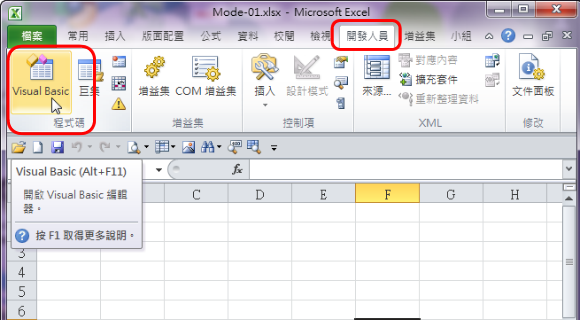
1.點擊-索引標籤>開發人員>程式碼>Visual Basic;如下圖;
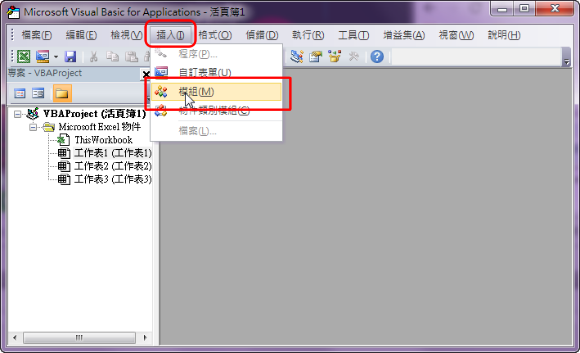
2.跳出Microsaft Visual Basi視窗,點擊-索引標籤>插入>模組;如下圖;
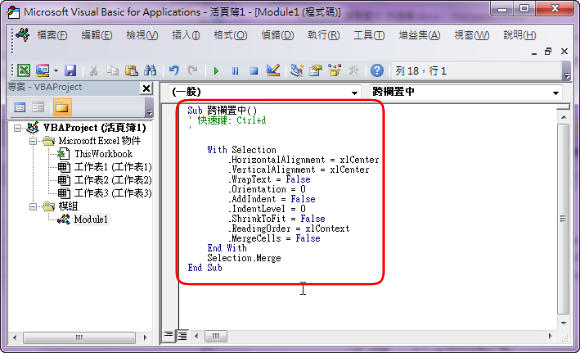
3.在工作區中輸入
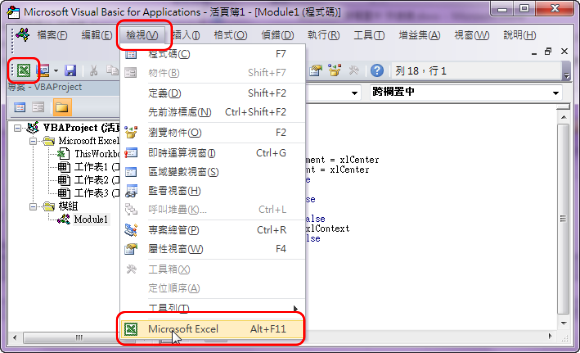
.4. 點擊-索引標籤>檢視>Microsoft Excel 或索引標籤下的Excel 圖示 或 Alt+F11;如下圖;
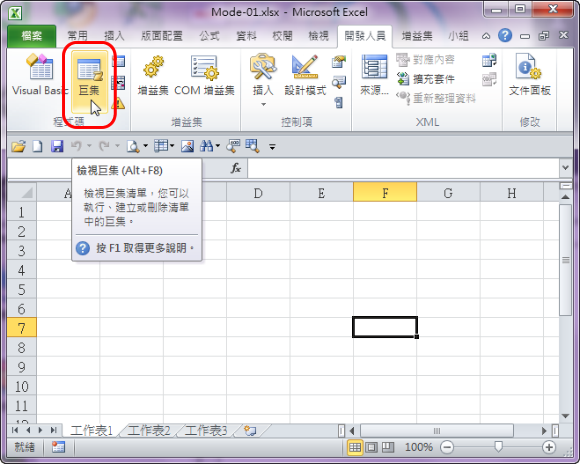
5.視窗跳至Excel -點擊-索引標籤>開發人員>程式碼>巨集;如下圖;
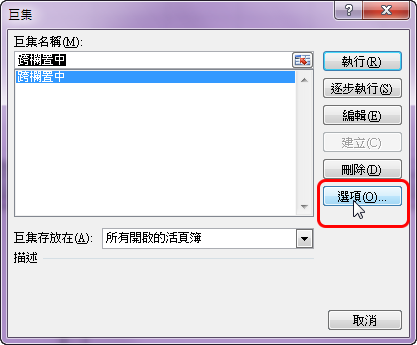
6.跳出巨集視窗,點擊選項;如下圖示:
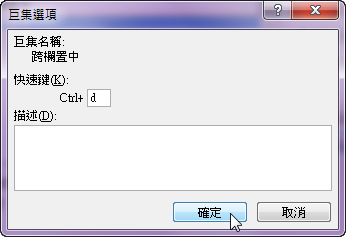
7.輸入欲設定的快捷鍵,並按確定;如下圖:( 注意:不要與原Excel快捷鍵相衝突 )
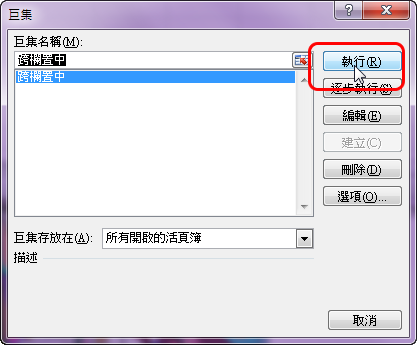
8.視窗跳回巨集視窗,點擊執行;如下圖示:
9.框選合併範圍;按 Ctrl + d;如下圖示:
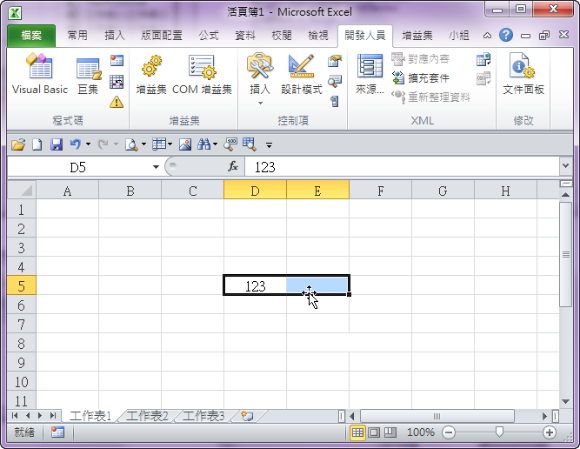
10.合併成功且置中;如下圖示:
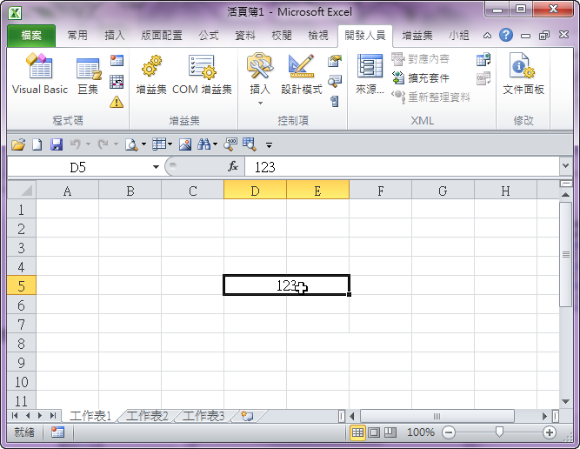
11.新設置的快捷鍵並不會自動傳到每一個Excel檔案內,所以需另存新檔(樣板檔)。
參考:Excel 跨欄置中 有沒有快捷鍵呢?
12.可以跨欄置中,當然可以跨欄靠左與跨欄靠右
跨欄靠左 >>
Sub 跨欄靠左()
' 快速鍵: Ctrl+s
'
With Selection
.HorizontalAlignment = xlLeft
.VerticalAlignment = xlCenter
.WrapText = False
.Orientation = 0
.AddIndent = False
.IndentLevel = 0
.ShrinkToFit = False
.ReadingOrder = xlContext
.MergeCells = False
End With
Selection.Merge
End Sub
跨欄靠右 >>
Sub 跨欄靠右()
' 快速鍵: Ctrl+s
'
With Selection
.HorizontalAlignment = xlRight
.VerticalAlignment = xlCenter
.WrapText = False
.Orientation = 0
.AddIndent = False
.IndentLevel = 0
.ShrinkToFit = False
.ReadingOrder = xlContext
.MergeCells = False
End With
Selection.Merge
End Sub
1.點擊-索引標籤>開發人員>程式碼>Visual Basic;如下圖;
2.跳出Microsaft Visual Basi視窗,點擊-索引標籤>插入>模組;如下圖;
3.在工作區中輸入
Sub 跨欄置中()
' 快速鍵: Ctrl+d
'
With Selection
.HorizontalAlignment = xlCenter
.VerticalAlignment = xlCenter
.WrapText = False
.Orientation = 0
.AddIndent = False
.IndentLevel = 0
.ShrinkToFit = False
.ReadingOrder = xlContext
.MergeCells = False
End With
Selection.Merge
End Sub
如下圖:.4. 點擊-索引標籤>檢視>Microsoft Excel 或索引標籤下的Excel 圖示 或 Alt+F11;如下圖;
5.視窗跳至Excel -點擊-索引標籤>開發人員>程式碼>巨集;如下圖;
6.跳出巨集視窗,點擊選項;如下圖示:
7.輸入欲設定的快捷鍵,並按確定;如下圖:( 注意:不要與原Excel快捷鍵相衝突 )
8.視窗跳回巨集視窗,點擊執行;如下圖示:
9.框選合併範圍;按 Ctrl + d;如下圖示:
10.合併成功且置中;如下圖示:
11.新設置的快捷鍵並不會自動傳到每一個Excel檔案內,所以需另存新檔(樣板檔)。
參考:Excel 跨欄置中 有沒有快捷鍵呢?
12.可以跨欄置中,當然可以跨欄靠左與跨欄靠右
跨欄靠左 >>
Sub 跨欄靠左()
' 快速鍵: Ctrl+s
'
With Selection
.HorizontalAlignment = xlLeft
.VerticalAlignment = xlCenter
.WrapText = False
.Orientation = 0
.AddIndent = False
.IndentLevel = 0
.ShrinkToFit = False
.ReadingOrder = xlContext
.MergeCells = False
End With
Selection.Merge
End Sub
跨欄靠右 >>
Sub 跨欄靠右()
' 快速鍵: Ctrl+s
'
With Selection
.HorizontalAlignment = xlRight
.VerticalAlignment = xlCenter
.WrapText = False
.Orientation = 0
.AddIndent = False
.IndentLevel = 0
.ShrinkToFit = False
.ReadingOrder = xlContext
.MergeCells = False
End With
Selection.Merge
End Sub


2018年2月13日 星期二

2018年2月1日 星期四
Visual Basic 2017 安裝
1.Google搜尋VISUAL STUDIO 下載,雙擊 Downloads|IDE,& Team .....;如下圖:
或 點擊 https://www.visualstudio.com/zh-hant/downloads/

2.點選 Community 2017 的 Free Download;如下圖所示:
 3.執行下載的 vs_community__660000410.1517416537.exe 執行檔;如下圖所示:

4.顯示一新安全警告視窗,點擊 [ 執行 ]按鈕;如下圖所示:

5.顯示一 Microsoft 隱私聲明,點擊 [ 繼續 ]按鈕;如下圖所示:

6.開始下載資料;如下圖所示:

7.準備就緒開始安裝資料;如下圖所示:

8.點擊 [ .NET 桌面開發 ] 選項右上角 方框與依需要是否要將 [ NET F4.7 開發工具 ] 與 [ NET F4.7.1 開發工具 ] 打勾載入;如下圖所示:

9.顯示安裝進度;如下圖所示:

10.視窗顯示安裝成功,點擊 [ 啟動 ] 按鈕;如下圖所示:

11.開始啟動 開新視窗顯示如下:

12.啟動完成,視窗顯示 Visual Basic2017 起始頁;如下圖所示:

13.如不習慣 深色底式樣,可在 [ 工具 ] 下 點選 [ 選項 ];如下圖所示:

14.顯示一新視窗,在 >>環境>>一般>>視覺效果>>色彩布置主題>>下拉式選單選擇您需要之選項後點擊 [ 確定 ];如下圖所示:

15.顏色改為白底黑字後,新增檔案步驟如下 開啟 [ 檔案 ] >> [ 新增 ] >> [ 專案 ];如下圖:

16.視窗顯示內定如下 ( 在Visual C# )

17.點選 [ Visual Basic ] >> Windows Forms App (.NET Framework);如下圖:

18. 點擊 [ Windows Forms App (.NET Framework) ] 按 [ 確定 ];如下圖:

19.建立專案 中....;如下圖:

20.視窗顯示 [ Visual Basic ] Form1.vb [ 設計 ];如下圖:

或 點擊 https://www.visualstudio.com/zh-hant/downloads/

2.點選 Community 2017 的 Free Download;如下圖所示:


4.顯示一新安全警告視窗,點擊 [ 執行 ]按鈕;如下圖所示:
5.顯示一 Microsoft 隱私聲明,點擊 [ 繼續 ]按鈕;如下圖所示:
6.開始下載資料;如下圖所示:
7.準備就緒開始安裝資料;如下圖所示:

8.點擊 [ .NET 桌面開發 ] 選項右上角 方框與依需要是否要將 [ NET F4.7 開發工具 ] 與 [ NET F4.7.1 開發工具 ] 打勾載入;如下圖所示:

9.顯示安裝進度;如下圖所示:

10.視窗顯示安裝成功,點擊 [ 啟動 ] 按鈕;如下圖所示:

11.開始啟動 開新視窗顯示如下:
12.啟動完成,視窗顯示 Visual Basic2017 起始頁;如下圖所示:

13.如不習慣 深色底式樣,可在 [ 工具 ] 下 點選 [ 選項 ];如下圖所示:

14.顯示一新視窗,在 >>環境>>一般>>視覺效果>>色彩布置主題>>下拉式選單選擇您需要之選項後點擊 [ 確定 ];如下圖所示:

15.顏色改為白底黑字後,新增檔案步驟如下 開啟 [ 檔案 ] >> [ 新增 ] >> [ 專案 ];如下圖:

16.視窗顯示內定如下 ( 在Visual C# )

17.點選 [ Visual Basic ] >> Windows Forms App (.NET Framework);如下圖:

18. 點擊 [ Windows Forms App (.NET Framework) ] 按 [ 確定 ];如下圖:

19.建立專案 中....;如下圖:

20.視窗顯示 [ Visual Basic ] Form1.vb [ 設計 ];如下圖:

2018年1月24日 星期三

2018年1月16日 星期二
英文發音網站,小寫草書
KK音標發音
KK1-https://drive.google.com/file/d/1p6c1HLSh5UbCICpu8Ehccp2xCgUK3YtJ/view?usp=sharing
KK2- https://drive.google.com/file/d/1U2Z7Q6F5SDFN0KYw1ierL4Md4bL3gPGj/view?usp=sharing
KK3-https://drive.google.com/file/d/1QjWLjhSuoAac3BsJk3W9eTbkPgI4NSMA/view?usp=sharing
KK4-https://drive.google.com/file/d/1vl4Y-Ez1Am7u1-UlELk2mMe8Tfc3k8Cx/view?usp=sharing
KK5-https://drive.google.com/file/d/1v2tLQKQaUDWeyAQDno9My8gfQK4yTDoD/view?usp=sharing
KK6-https://drive.google.com/file/d/1BpcJB3eUhFMuD067RWZ4x730mGvoUDDz/view?usp=sharing
KK7-https://drive.google.com/file/d/1719k8Wf2zW75JN1WASSPR4vNQ0oQ9LZ7/view?usp=sharing
KK8-https://drive.google.com/file/d/1MF57czqzRVXHsEH8oR_r4TkqEDkEghba/view?usp=sharing
KK9-https://drive.google.com/file/d/1pMLFGnJpVpwOWbakE8Q5Re8QTLAtxllm/view?usp=sharing
KK10-https://drive.google.com/file/d/17aX4DED3H1QL3M8QbcU57luLf1bqVx9M/view?usp=sharing
KK11-https://drive.google.com/file/d/1_p6coQwFNM-H5o4vwE0kB-OgzUusW6Gz/view?usp=sharing
KK12-https://drive.google.com/file/d/1eqrHVKsyOzsIfSATb8zw44I9nEMfUcsx/view?usp=sharing
音標札記.xlsx https://drive.google.com/file/d/1_uImoo6f7RBPnMoB028RY4vQd4t1oI9V/view?usp=sharing
 ==============================================
影片剪輯軟體:https://pcrookie.com/?p=96
==============================================
https://www.youtube.com/watch?v=QJwbUp-cZ5A
https://www.youtube.com/watch?v=ZjuZQN-u3zk
https://www.youtube.com/watch?v=ki0KcBeXUsE
https://www.tubeon.com/video/23276/asian-schoolgirl-sana-anju-gets-pumped-hard-in-group-sex-and-gets-lots-of-cum
https://www.bravoporn.com/videos/384325/001
https://www.bravoporn.com/videos/410523/002
https://www.bravoporn.com/videos/262883/003
https://www.bravoporn.com/videos/388661/-004
https://www.bravoporn.com/videos/334858/-005
https://www.bravoporn.com/videos/389382/-006
https://www.bravoporn.com/videos/401893/-007
https://www.bravoporn.com/videos/35928/-008
https://www.bravoporn.com/videos/374806/---009
https://www.bravoporn.com/videos/105730/-010
https://www.bravoporn.com/videos/162335/-011
https://www.bravoporn.com/videos/36822/-012
https://www.bravoporn.com/videos/125571/-013
https://www.bravoporn.com/videos/177189/-014
https://www.bravoporn.com/videos/283488/-015
https://www.bravoporn.com/videos/177222/-016
https://www.bravoporn.com/videos/335167/
https://www.youtube.com/watch?v=EhkcPvwpK5k
https://www.youtube.com/watch?v=riCsiREWsoo
https://www.youtube.com/watch?v=HoiE_LUhrNY
KK1-https://drive.google.com/file/d/1p6c1HLSh5UbCICpu8Ehccp2xCgUK3YtJ/view?usp=sharing
KK2- https://drive.google.com/file/d/1U2Z7Q6F5SDFN0KYw1ierL4Md4bL3gPGj/view?usp=sharing
KK3-https://drive.google.com/file/d/1QjWLjhSuoAac3BsJk3W9eTbkPgI4NSMA/view?usp=sharing
KK4-https://drive.google.com/file/d/1vl4Y-Ez1Am7u1-UlELk2mMe8Tfc3k8Cx/view?usp=sharing
KK5-https://drive.google.com/file/d/1v2tLQKQaUDWeyAQDno9My8gfQK4yTDoD/view?usp=sharing
KK6-https://drive.google.com/file/d/1BpcJB3eUhFMuD067RWZ4x730mGvoUDDz/view?usp=sharing
KK7-https://drive.google.com/file/d/1719k8Wf2zW75JN1WASSPR4vNQ0oQ9LZ7/view?usp=sharing
KK8-https://drive.google.com/file/d/1MF57czqzRVXHsEH8oR_r4TkqEDkEghba/view?usp=sharing
KK9-https://drive.google.com/file/d/1pMLFGnJpVpwOWbakE8Q5Re8QTLAtxllm/view?usp=sharing
KK10-https://drive.google.com/file/d/17aX4DED3H1QL3M8QbcU57luLf1bqVx9M/view?usp=sharing
KK11-https://drive.google.com/file/d/1_p6coQwFNM-H5o4vwE0kB-OgzUusW6Gz/view?usp=sharing
KK12-https://drive.google.com/file/d/1eqrHVKsyOzsIfSATb8zw44I9nEMfUcsx/view?usp=sharing
音標札記.xlsx https://drive.google.com/file/d/1_uImoo6f7RBPnMoB028RY4vQd4t1oI9V/view?usp=sharing

影片剪輯軟體:https://pcrookie.com/?p=96
==============================================
https://www.youtube.com/watch?v=QJwbUp-cZ5A
https://www.youtube.com/watch?v=ZjuZQN-u3zk
https://www.youtube.com/watch?v=ki0KcBeXUsE
https://www.tubeon.com/video/23276/asian-schoolgirl-sana-anju-gets-pumped-hard-in-group-sex-and-gets-lots-of-cum
https://www.bravoporn.com/videos/384325/001
https://www.bravoporn.com/videos/410523/002
https://www.bravoporn.com/videos/262883/003
https://www.bravoporn.com/videos/388661/-004
https://www.bravoporn.com/videos/334858/-005
https://www.bravoporn.com/videos/389382/-006
https://www.bravoporn.com/videos/401893/-007
https://www.bravoporn.com/videos/35928/-008
https://www.bravoporn.com/videos/374806/---009
https://www.bravoporn.com/videos/105730/-010
https://www.bravoporn.com/videos/162335/-011
https://www.bravoporn.com/videos/36822/-012
https://www.bravoporn.com/videos/125571/-013
https://www.bravoporn.com/videos/177189/-014
https://www.bravoporn.com/videos/283488/-015
https://www.bravoporn.com/videos/177222/-016
https://www.bravoporn.com/videos/335167/
https://www.youtube.com/watch?v=EhkcPvwpK5k
https://www.youtube.com/watch?v=riCsiREWsoo
https://www.youtube.com/watch?v=HoiE_LUhrNY
2018年1月15日 星期一
2018年1月8日 星期一
20180108(第2週)記事
記事
1. ANSI Common Lisp 中文版-->衍伸LaTeX排版 (從沒用過!!聽說過!!)
2. 跨越邊界 Lisp 之美-->衍伸office word 書籤 (太久沒用忘了!!溫習一下)
1. (a).將欲製作書籤的目標字串 (即目的地) 用滑鼠反白並copy (Ctrl+C),(b).menu > 插入 > 連結 > 書籤;(c).再在書籤名稱攔內 貼上(Ctrl+v) 剛 Copy 的字串,並點擊 [新增] 鈕。
1. ANSI Common Lisp 中文版-->衍伸LaTeX排版 (從沒用過!!聽說過!!)
2. 跨越邊界 Lisp 之美-->衍伸office word 書籤 (太久沒用忘了!!溫習一下)
1. (a).將欲製作書籤的目標字串 (即目的地) 用滑鼠反白並copy (Ctrl+C),(b).menu > 插入 > 連結 > 書籤;(c).再在書籤名稱攔內 貼上(Ctrl+v) 剛 Copy 的字串,並點擊 [新增] 鈕。
2. 在書籤目錄相對應的字串反白 點擊滑鼠右鍵,在快捷選單內點擊 [ 超連結 ]
3. 在[插入超連結]視窗左端 (連結至:) (a).點選 [這份文件中的位置(A)]。(b).在視窗中下(選擇文件中的一個位置(C))反白相對應字串,並點擊下端[確定]鈕。
訂閱:
文章 (Atom)